
Underwriting

Real Estate Deal Analysis and Underwriting

Keep property facts, renovation assumptions, financing, operating performance, and return summaries connected to the property being evaluated.

ReiSearch Co-Living Underwriting workspace with renovation, revenue, expense, funding, holding-cost, and summary sections visible

Keep the underwriting model connected to the subject property's research and deal information.

Organize renovation, financing, revenue, expense, and holding-cost assumptions into distinct sections.

Review calculated summaries without rebuilding the property in a separate spreadsheet.

Key capabilities

Explore the verified tools available in this workflow.

Strategy navigation for Cash, Co-Living, Short Term, Mid Term, and Long Term workflows
A source-backed Co-Living calculator with post-renovation details, repair costs, appliances, conversion, furnishing, revenue, expenses, financing, mortgage, holding costs, and a summary
Section-level saving and underwriting version selection
Monthly and annual views for supported strategy summaries
Direct access from the subject property's Underwriting tab

Keep evidence and assumptions together

An underwriting result is only as useful as its inputs. ReiSearch keeps the model inside the property workspace so users can move between the subject property, comparable-property evidence, deal terms, and the assumptions used in the calculation.

Current verified scope

The current live-verified calculator is the Co-Living workflow. It organizes post-renovation property details, repair and renovation costs, appliance and furnishing costs, co-living conversion costs, operating revenue and expenses, funding sources, existing mortgage data, holding costs, and an underwriting summary.

The interface also exposes Cash, Short Term, Mid Term, and Long Term strategy tabs. Detailed guidance will be added only after each strategy is verified in the live product.
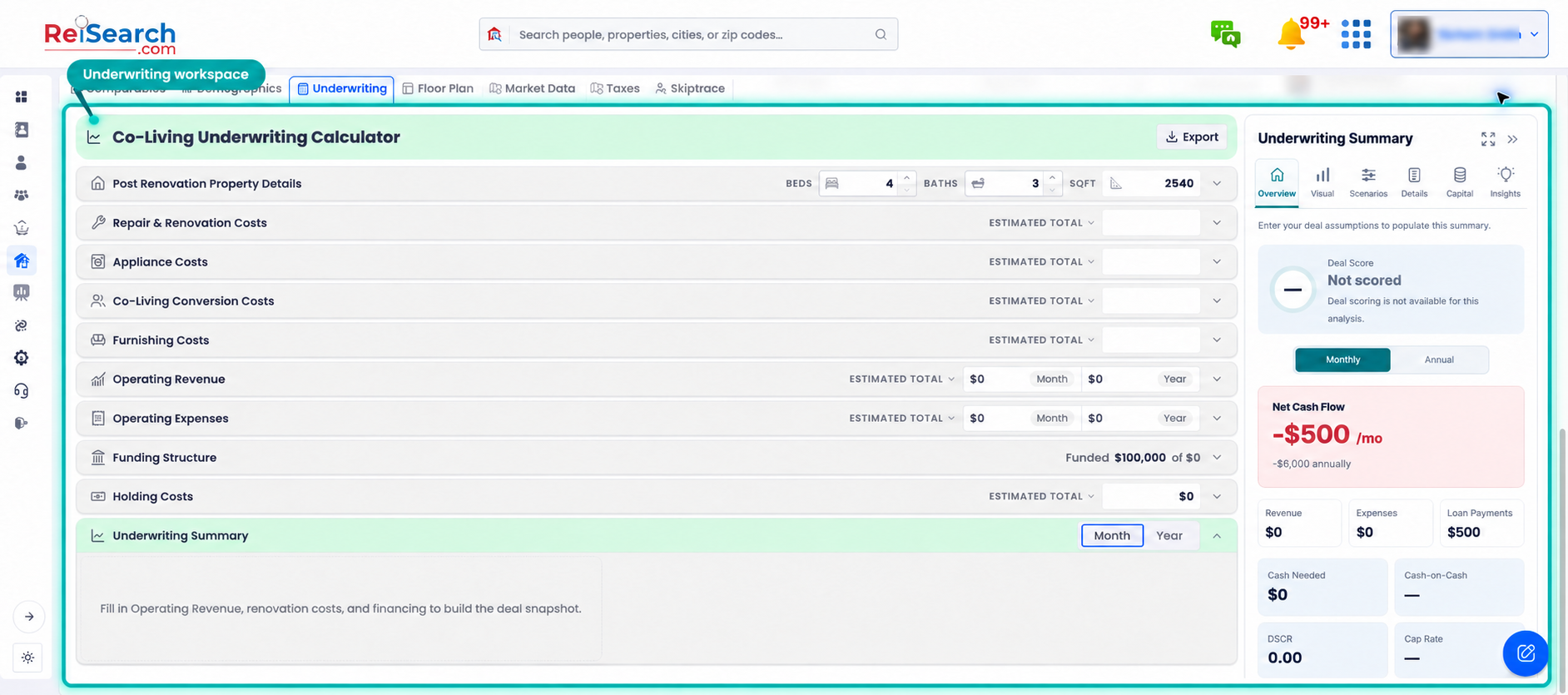
ReiSearch Co-Living Underwriting workspace with renovation, revenue, expense, funding, holding-cost, and summary sections visible

The full product view keeps the property navigation visible while focusing on the underwriting sections and summary panel.

Use analysis as a decision record

Underwriting should show where a conclusion came from, not only produce a final number. Preserve the source of the property facts, distinguish estimates from confirmed terms, and test changes to price, repairs, financing, revenue, vacancy, expenses, and exit assumptions before making a decision.

Learn how to analyze a real estate investment deal.