
Open Comp Ranking Weights
Open a property’s comps workspace and select Weights. Then select the comp type you want to configure. Settings are stored separately by comp type, so changing Sold Comps does not automatically change Long Term Rental or Short Term Rental.
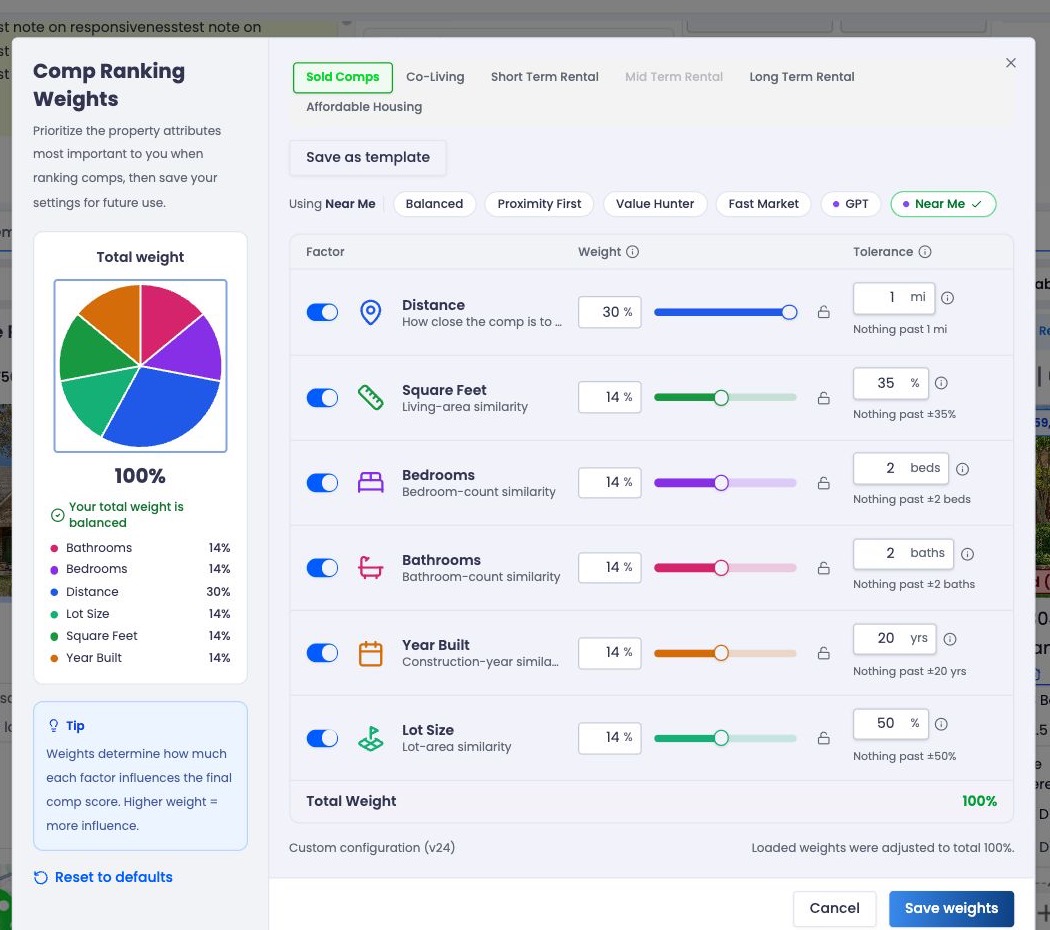
The total-weight chart and factor controls update together as you adjust the ranking configuration.
Available ranking criteria
The configuration can include:
| Criterion | What it compares | Tolerance unit |
|---|---|---|
| Distance | Proximity to the subject | Miles |
| Square Feet | Living-area similarity | Percent |
| Bedrooms | Bedroom-count similarity | Beds |
| Bathrooms | Bathroom-count similarity | Baths |
| Year Built | Construction-year similarity | Years |
| Price | Price similarity to the subject | Percent |
| Lot Size | Lot-area similarity | Percent |
| Price / SqFt | Price-per-square-foot similarity | Percent |
| Days on Market | Market-time comparison | Days |
Only criteria returned in the selected comp type’s configuration are displayed.
Weight controls importance
Weight is relative. If Distance has weight 30 and Bedrooms has weight 10, Distance contributes three times as much as Bedrooms to the combined score.
Weights range from 0 to 100. A criterion must be enabled to participate. At least one enabled criterion must have a weight greater than zero before the configuration can be saved.
Avoid treating weights as percentages: The values describe importance relative to one another. They do not need to add up to 100 because ReiSearch normalizes the active criteria.
Tolerance controls strictness
Tolerance defines how much difference is acceptable for a criterion. Smaller tolerances make the ranking stricter; larger tolerances allow a wider difference before similarity falls as strongly.
Examples:
- A smaller distance tolerance favors comps close to the subject more aggressively.
- A larger square-foot tolerance allows broader living-area differences.
- A smaller year-built tolerance favors properties built closer to the subject’s year.
Use tolerance to express the boundary of “similar enough,” then use weight to express how important that boundary is relative to other criteria.
Save and review the effect
Select Save weights. ReiSearch saves the configuration and re-ranks existing comps when they reload; a new comp run is not required.
Return to the property’s comps workspace. When custom scoring is active:
- A Custom scoring indicator appears.
- The initial result order is score descending.
- Manual sorting can still override the initial order.
Discard unsaved changes
Select Cancel to leave without saving the current changes. Use Reset to defaults when you want to restore ReiSearch’s default ranking configuration.
A practical starting approach
Start with the criteria most important to the specific strategy. Change a small number of settings, save, and review how the top results change. Large simultaneous adjustments make it harder to understand why the ranking moved.