
Every message has a set of quick actions. Hover a message on a computer (or press and hold on your phone) to reply, edit, or delete it — and in group and property threads, you can mention people by name.
Reply to a message
Open a message’s actions and choose Reply. A preview of the original message appears above the message box, so the other person can see exactly what you’re responding to. Your reply shows the quoted message attached to it.
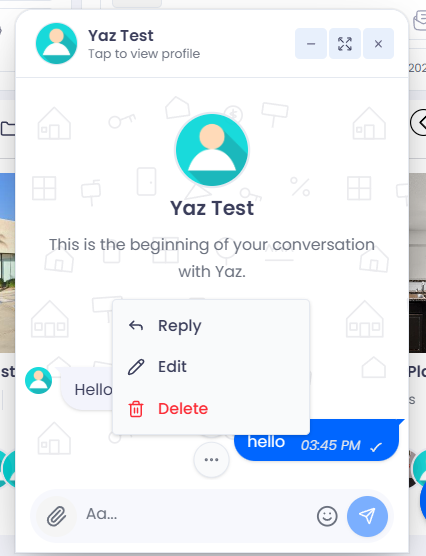
Open a message’s actions: Reply, Edit, Delete. (Groups also show Pin.)
Mention someone (groups & property threads)
In a group or property thread, type @ in the message box and start typing a member’s name. Pick them from the list to mention them — they’ll get a notification that they were mentioned. Mentions aren’t available in one‑on‑one direct messages (the other person already gets every message).
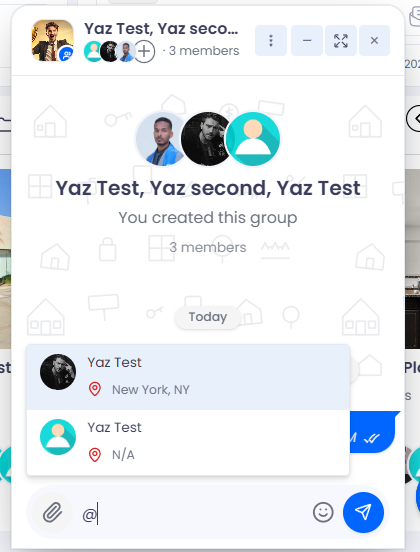
Type @ to bring up the list of people to mention.
Edit a message
Open the actions on a message you sent and choose Edit. Change the text and send again — the message is updated for everyone and marked as edited so the change is transparent.
Delete a message
Choose Delete on a message and you’ll be asked how far the deletion should reach:
- Delete for me — removes the message from your view only; others still see it.
- Delete for everyone — removes it for all participants.
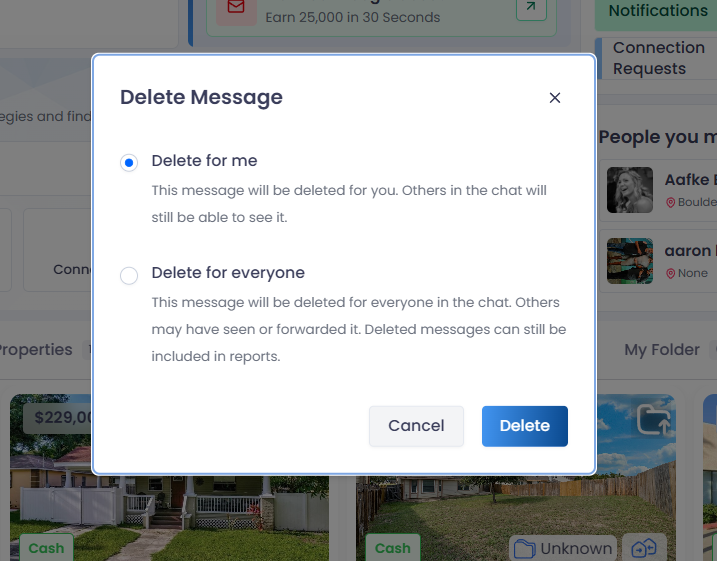
Deleting lets you choose ‘for me’ or ‘for everyone’.
Frequently asked questions
Can I edit or delete someone else’s message?
No. You can only edit or delete messages you sent. ‘Delete for everyone’ removes your own message for all participants.
Will people know I edited a message?
Yes — edited messages are labeled ‘edited’ so the conversation stays transparent.