
Reactions let you respond to a message with a single emoji, and pinning keeps an important message at the top of a group so everyone can find it.
React to a message
Open a message’s actions to reveal the quick‑reaction row — a curated set of emojis (👍 ❤️ 🤝 🏠 🔑 💰 🔥 📈 ✍️ 💯 👀). Tap one to react. Need a different emoji? Tap the + to open the full emoji picker.

The quick-reaction row, with “+” for the full emoji picker.
See who reacted, or remove yours
Reactions appear as small pills under the message. Tap a reaction to see who reacted and with what. Your own reaction is highlighted — tap it again to remove it.
Pin a message (groups & property threads)
In a group or property thread, open a message’s actions and choose Pin. The pinned message shows in a banner at the top of the conversation so everyone can jump to it. Open the actions again and choose unpin to remove it.
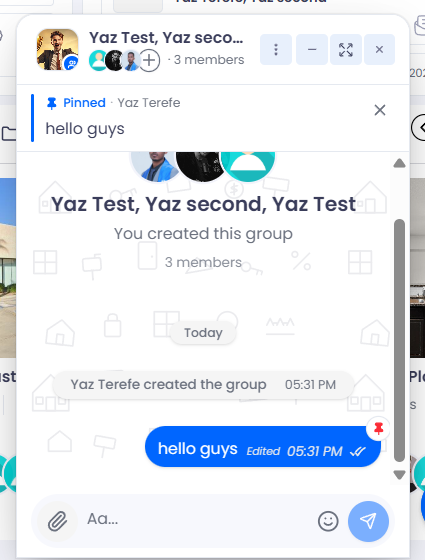
A pinned message stays in a banner at the top of the conversation.
Pinning is for groups: Pinning is available in group chats and property threads. One‑on‑one direct messages don’t have pinned messages.