
Notifications aren’t just announcements — most take you straight to the right place, and some let you act on them without leaving.
Click to jump there
Clicking a notification opens whatever it’s about — so you go straight to the thing, not just a list:
| Notification | Where it takes you |
|---|---|
| A message or mention | Opens that conversation |
| A feed reaction, comment or mention | Opens the post or comment |
| A shared property, comp result or note mention | Opens that property |
| A folder change | Opens your folders |
| A smart alert | Opens the monitored property |
Respond without leaving
A few notifications include buttons so you can act right from the notification itself:
- Connection requests — Accept or Decline right there.
- Address requests — when someone asks for a property’s full address, Accept or Reject the request inline.
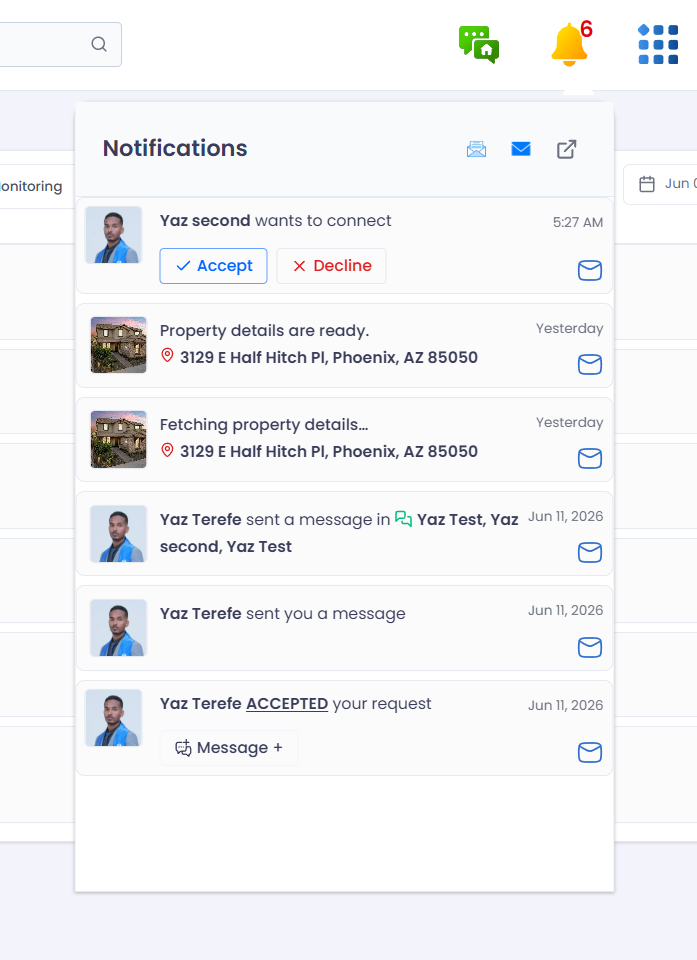
Some notifications, like connection requests, have inline actions.